
Most rental businesses involve more than one person. You might have a co-host, a cleaner, a bookkeeper, or a maintenance contractor — and each of them needs different levels of access to your ArrivHQ account. You do not want your cleaner editing your financial records, and you do not want your bookkeeper managing guest checklists.
ArrivHQ handles this with a two-tier role system. Tenant roles control organization-wide access. Property roles control what a member can do within each specific property they are assigned to.
Tenant roles
Every team member has exactly one tenant role:
Owner — full access to all properties, team management, and billing. When you create your ArrivHQ account, you become the owner. At least one owner must exist at all times.
Admin — full access to all properties and team management. Admins cannot manage billing. This is the right role for a co-host who helps run everything but does not handle payments.
Member — access limited to assigned properties only. What they can see and do on each property depends on their property role. This is the right role for cleaners, bookkeepers, and maintenance contractors.
Owners and admins bypass all property-level permission checks. They have full access to every property automatically, without needing property role assignments.
Property roles
Members are assigned a property role on each property they can access. A member can have different roles on different properties — manager on one, cleaner on another.
Manager — full property access. Can view and edit property details, reservations, expenses, revenue logs, work logs, mileage, checklists, inventory, and damage claims. Can manage calendar sync connections, access packs, and bank sync (Plaid). Can use the AI support chat. Can manage checklists and edit records created by others.
Cleaner — can view the property and limited reservation details. Can view and complete checklists assigned to them. Can view damage claims and upload damage photos.
Maintenance — similar to cleaner. Can view the property and limited reservation details, complete assigned checklists, and upload damage photos.
Bookkeeper — can view the property, full reservation details, expenses, revenue logs, mileage logs, and inventory. Can create expenses, revenue logs, and mileage logs. Can create data exports. Can view damage claims. Can use the AI support chat.
Viewer — read-only access to property details, limited reservation info, work logs, mileage, expenses, and damage claims.
The key distinction: managers can do everything on their assigned properties — including connecting bank accounts, managing calendar sync, and using the AI support chat. Cleaners and maintenance staff can complete checklists and document damage, but cannot create or edit tasks, expenses, or reservations. Bookkeepers handle the financial side without touching operations, and also have access to the AI support chat for billing questions. Viewers can see but not change anything.
Inviting team members
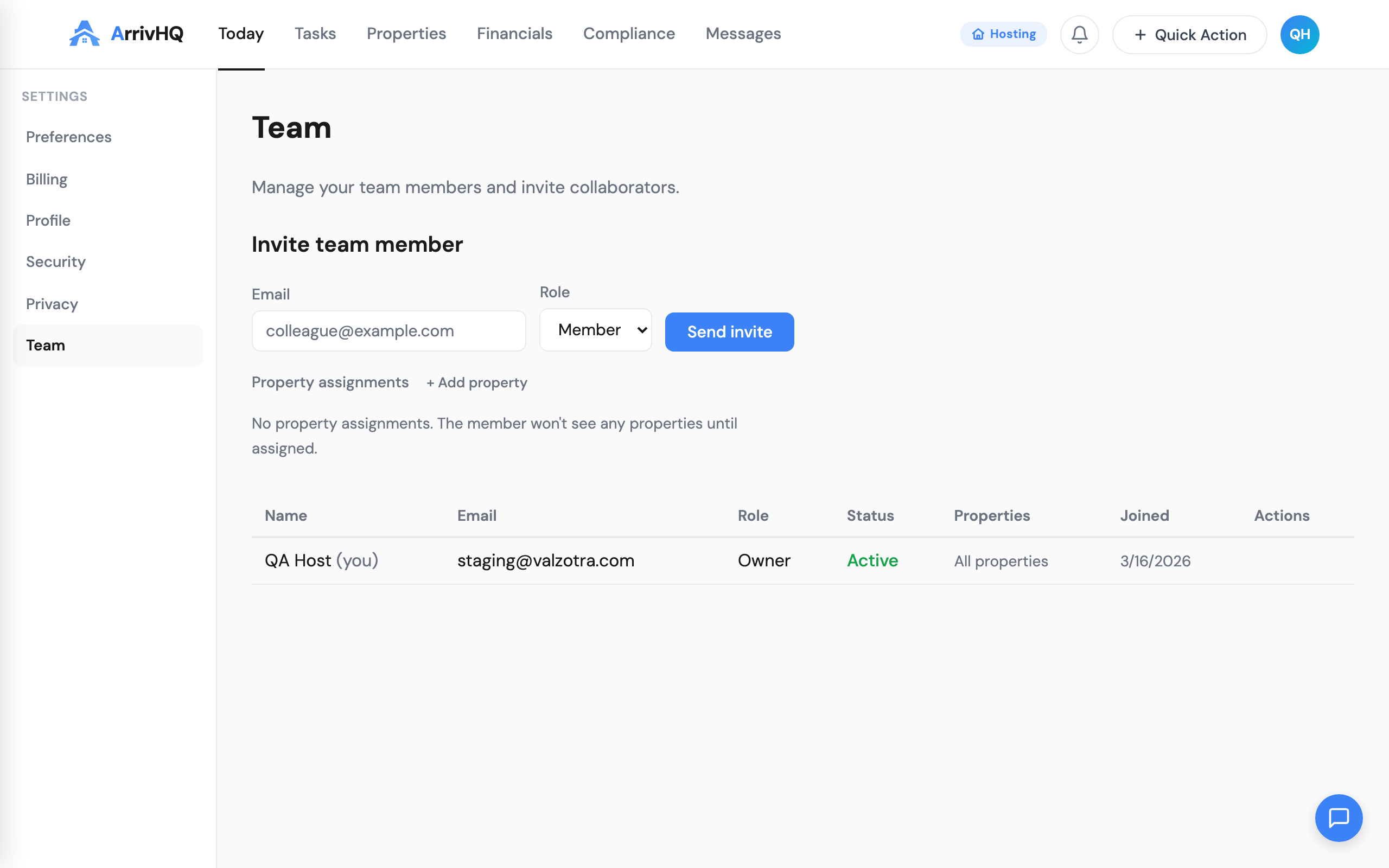
Go to Settings > Team and click Invite Member. Enter the person's email address, select their tenant role (Admin or Member), and — for members — optionally assign one or more properties with a property role for each.
Click Send Invite. The person receives an email with a join link. Invite links expire after 7 days, but you can resend from the team list if needed. When the person clicks the link, they either sign up for a new ArrivHQ account or log in with an existing one. Their membership activates automatically.
A few things to note:
- Only owners and admins can send invites.
- Only owners can invite someone with the owner role.
- Both active members and pending invites count toward your plan's member limit.
- Property assignments are only available for the member role. Admins and owners automatically have access to all properties.
If someone already has an ArrivHQ account — maybe they are a host themselves or a team member on another organization — clicking the join link connects their existing account to your organization. They can switch between organizations using the tenant switcher in the top-right menu.
Team limits by plan
Your plan determines how many team member seats you get. The owner counts as one of those seats.
- Comply ($19/mo) — 1 seat (owner only). No invites available.
- Host ($34/mo) — 3 seats. Owner plus up to 2 invited members.
- Portfolio ($49/mo) — 5 seats. Owner plus up to 4 invited members.
- Portfolio + Property Pack ($78/mo) — 9 seats. Each Property Pack adds 4 more seats.
When you are at the limit, the invite form shows a message indicating how many seats are in use. To add more members, you can disable a member you no longer need, purchase a Property Pack (Portfolio only), or upgrade your plan.
Both active members and pending invites count toward the limit. Disabled members do not.
Removing and disabling members
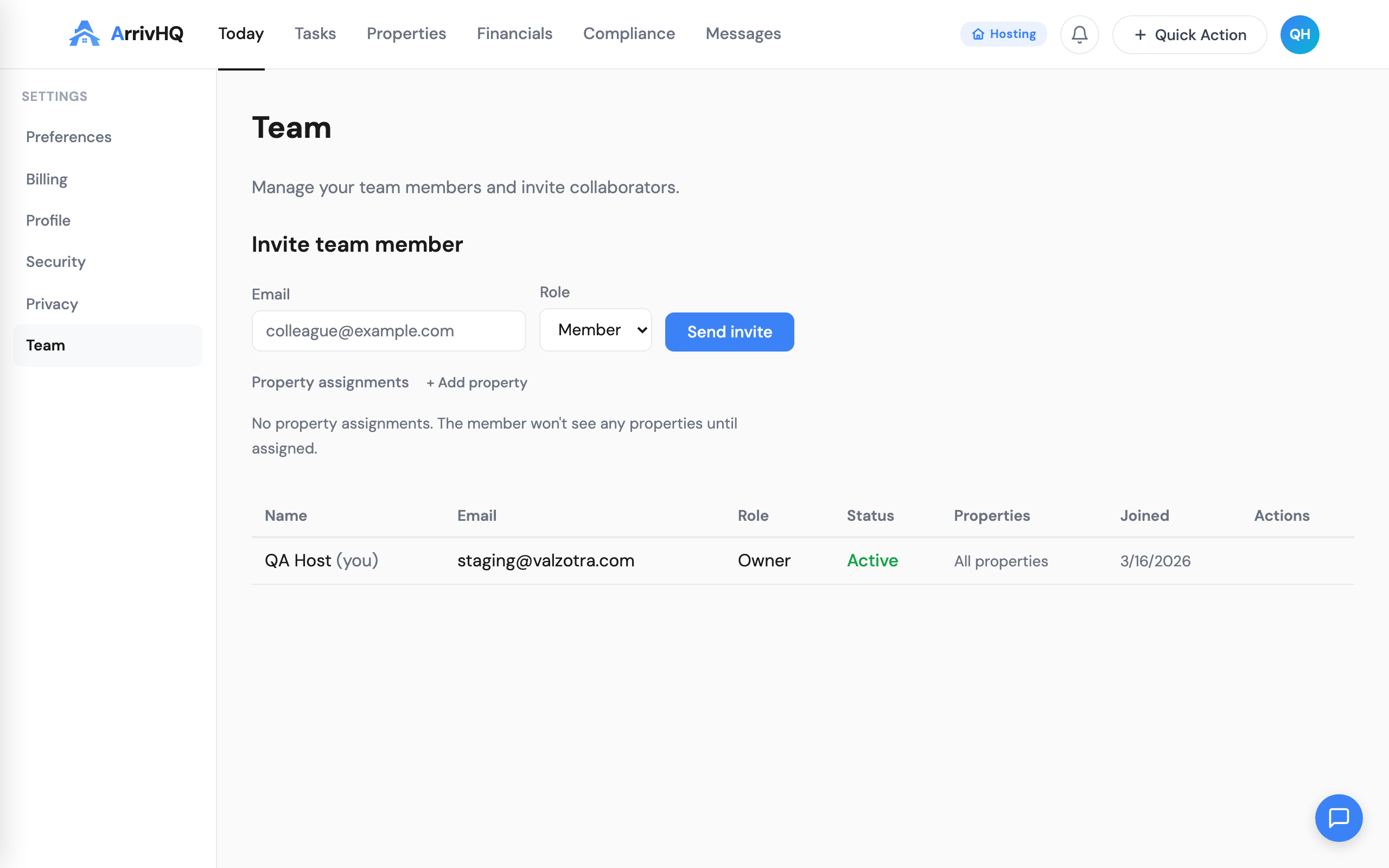
When someone leaves your team, go to Settings > Team, find the member, and select Disable. Their access is revoked immediately and all property assignments are removed.
Historical records created by the removed member — work logs, expenses, completed checklists — are preserved. Their user ID stays attached to those records for audit purposes. You cannot permanently delete a team member; disabling preserves the integrity of historical data.
If you need to bring someone back, re-enable them from the team list. You will need to manually re-assign their property roles, since previous assignments are not restored automatically.
Members can also leave voluntarily from Settings > Leave Team. The sole owner cannot leave — they must transfer ownership or delete the organization.
Multi-tenant support
A person can belong to multiple ArrivHQ organizations. This is common for cleaners or property managers who work with multiple hosts. They use the tenant switcher in the top-right menu to move between organizations. Each organization's data is completely isolated — being a member of one organization does not grant any access to another.
What managers and bookkeepers can do now
As ArrivHQ has grown, so has what each role can access. Here is a quick summary of the expanded capabilities:
Managers can now manage calendar sync connections (Airbnb, VRBO iCal imports), access packs for guest check-in, bank sync through Plaid, and inventory — all scoped to their assigned properties. They also have access to the AI support chat.
Bookkeepers can now view revenue logs and inventory alongside expenses and mileage logs. They also have access to the AI support chat, which helps with billing and financial questions.
All permission checks happen at the property level. A manager on Property A cannot access data on Property B unless they are also assigned there. Owners and admins bypass all of these checks — they always have full access.
For the complete reference, see the Team documentation.